

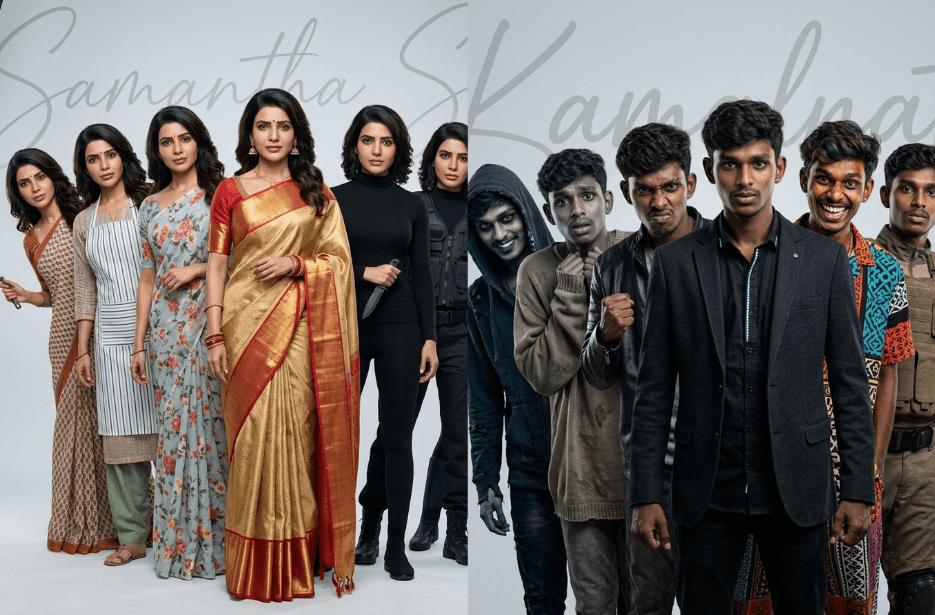
Imagine creating different versions of yourself, where each one thinks or expresses a different side of you. With the right AI prompts, this idea is no longer just imagination but a practical tool anyone can use. By giving the right instructions, you can shape an AI to act like a teacher, a storyteller, a strategist, or even a future version of you. This article explores how simple prompts can unlock multiple “versions” of yourself.
Version 1: Seven Days of Work
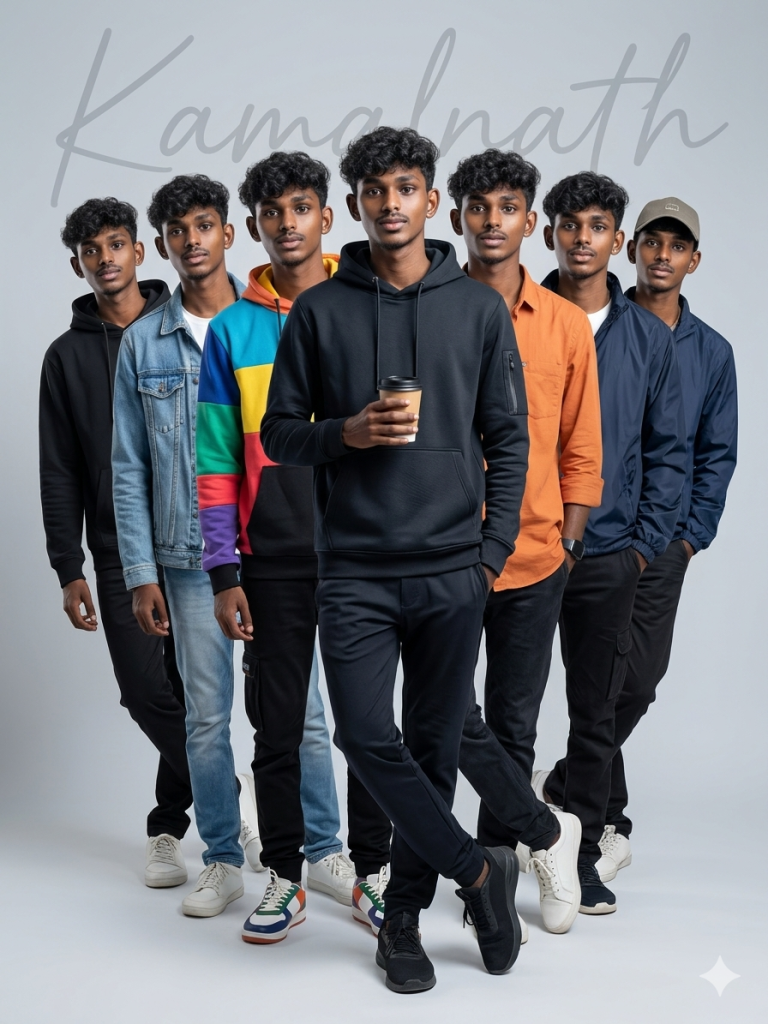
Composition: centered, vertical framing, layered depth with subtle left-to-right lean, clean symmetrical arrangement.
Background: smooth light gray seamless studio backdrop with a large semi-transparent handwritten signature watermark “Kamalnath” spanning across the background.
Lighting: soft professional studio lighting, evenly diffused, minimal shadows, corporate editorial look.
Style: ultra-realistic, corporate tech editorial photography, sharp focus, high detail, 4K.
Color grading: neutral tones, modern tech aesthetic, minimal contrast, slightly cool temperature.
Typography: elegant handwritten signature “Kamalnath” watermark in the background, small minimal brand mark top right, subtle website text bottom left.
Camera: full body shot, 50mm lens, f/8, studio photography, eye-level angle.
Mood: confident, clean, modern IT professional, startup founder energy, corporate-meets-tech editorial.
Version 2: The Deadly Queen
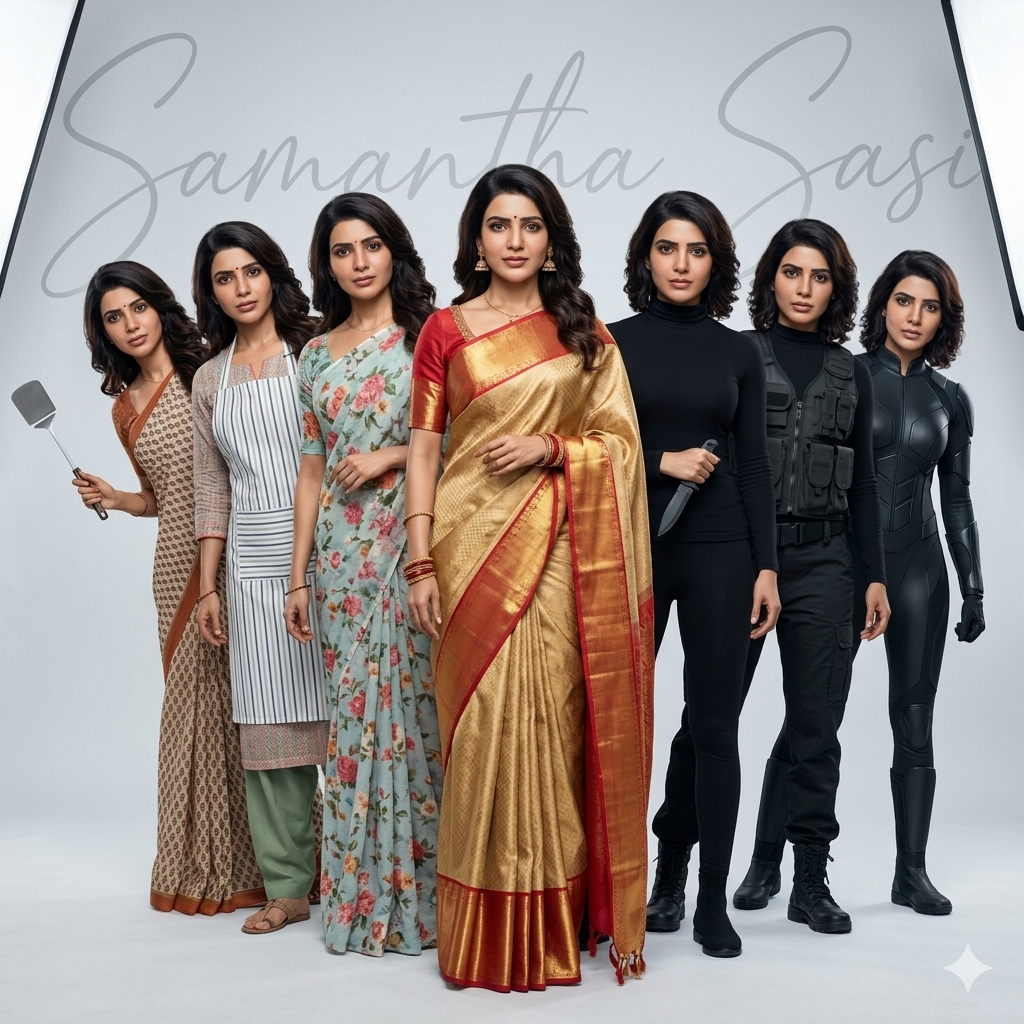
Left side three figures represent daytime housewife looks: simple cotton saree with dosa turner, apron over home outfit, casual domestic wear.
Right side three figures represent night assassin transformation: minimalist black outfit, tactical jacket, sleek stealth assassin suit.
All versions share identical facial features, hairstyle, and proportions.
Composition: identical to staggered lineup portrait, center dominant subject, others leaning diagonally from behind, evenly spaced, symmetrical balance, clean depth layering.
Background: plain light grey seamless studio backdrop with large semi-transparent handwritten signature “Samantha Sasi” watermark spanning across the top of the entire background.
Lighting: soft professional studio lighting, evenly lit, minimal shadows, clean editorial look.
Style: ultra-realistic, corporate editorial photography, sharp focus, high detail, 4K.
Camera: full body framing, 50mm lens, eye-level, studio photography.
Mood: traditional housewife by day, stealth assassin by night, clean modern editorial composition.
Version 3: Multiversal War
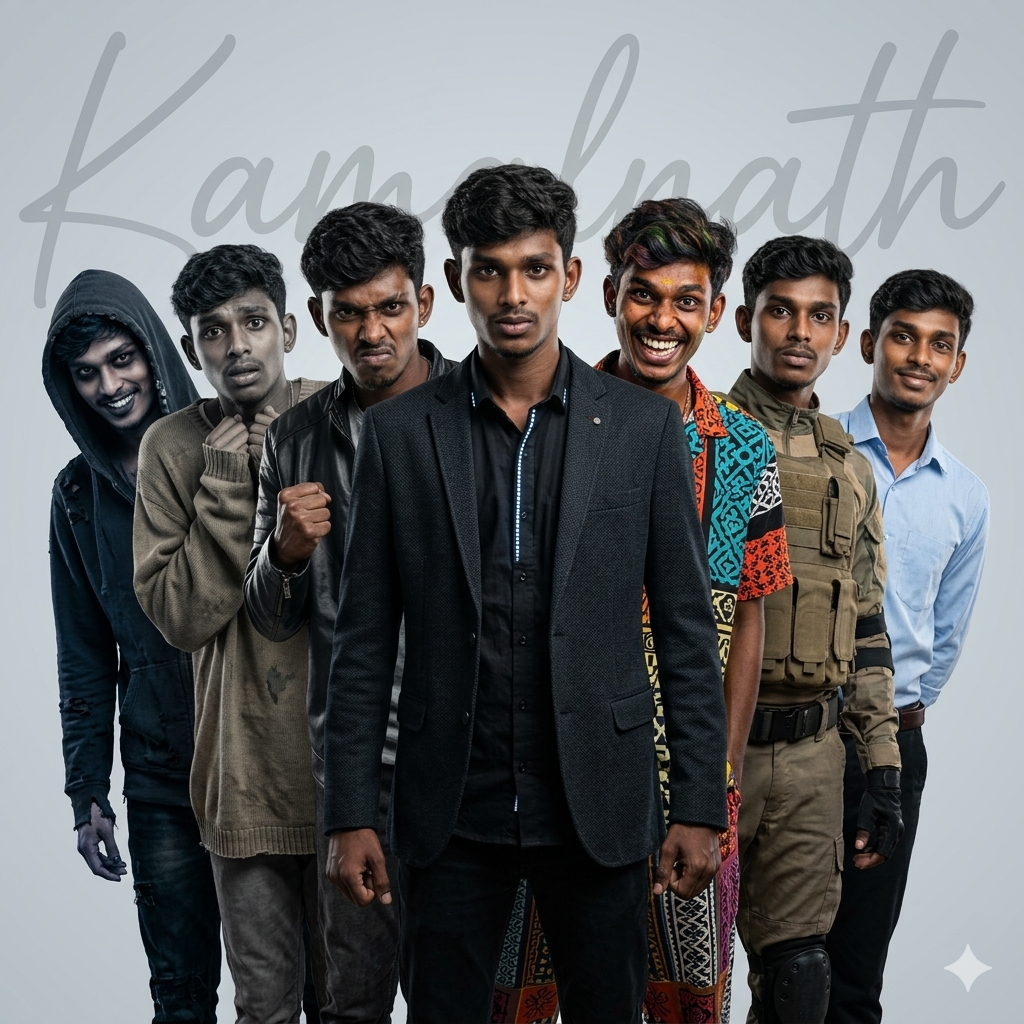
Three alternate versions lean from behind on the left side and three on the right side, all partially visible creating layered depth. Each version represents a different multiverse personality: one good and calm, one evil and dark, one fearful and anxious, one crazy and unpredictable, one brave and heroic, one angry and intense. Each variation has distinct clothing, posture, and expression but identical facial features and hairstyle.
Composition: centered square layout, dominant middle character, symmetrical 3-left and 3-right staggered leaning arrangement, clean depth layering identical to editorial lineup photography.
Background: clean light grey seamless studio backdrop with large semi-transparent handwritten signature watermark “Kamalnath” stretching across the entire background.
Lighting: soft professional studio lighting with subtle dramatic highlights to enhance multiverse mood, evenly diffused, minimal shadows.
Style: ultra-realistic cinematic editorial photography, sharp focus, high detail, 4K.
Color grading: neutral base tones with subtle color variation per character (cool tones for evil, warm for good, desaturated for fearful, high contrast for angry, vibrant for crazy, balanced for brave).
Camera: full body framing, 50mm lens, eye-level studio photography.
Mood: multiverse confrontation, heroic center figure, different emotional personalities, cinematic yet clean editorial composition.
Version 4: Sevenfold Existence
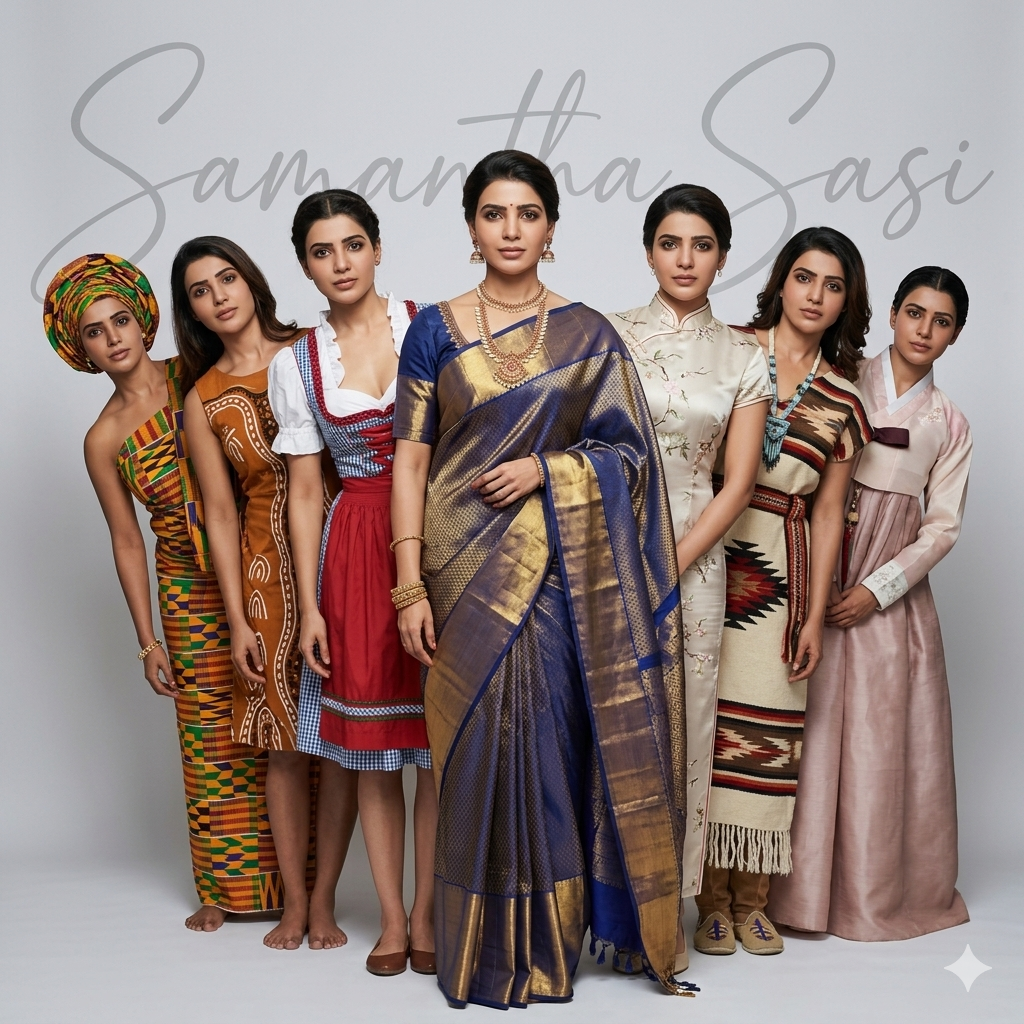
Multiple versions of the same woman arranged in a staggered leaning lineup. The center figure represents South India, fully visible, wearing an elegant traditional South Indian saree with subtle jewelry, neutral expression (no smile), calm and confident posture.
Three alternate versions lean from behind on the left side and three on the right side, all partially visible, creating layered depth. Each version represents traditional outfits from different regions of the world: African traditional attire with vibrant patterns, Australian indigenous-inspired traditional clothing, Chinese traditional dress, American traditional heritage outfit, Korean hanbok-style attire, and European classic traditional dress. All versions must have identical facial features, hairstyle, and proportions matching the uploaded photo exactly, with neutral expressions (no smile).
Composition: centered square layout, dominant middle character, symmetrical 3-left and 3-right staggered leaning arrangement, clean depth layering identical to high-end editorial lineup photography.
Background: clean light grey seamless studio backdrop with a large semi-transparent handwritten signature watermark “Samantha Sasi” stretching across the entire background.
Lighting: soft professional studio lighting, evenly diffused, minimal shadows, bright and elegant editorial look with natural skin tones and realistic highlights.
Style: ultra-realistic multicultural editorial photography, sharp focus, high detail, true-to-life textures, 4K resolution, natural skin rendering, no artificial or AI-like artifacts.
Color grading: natural, balanced tones highlighting each cultural outfit while maintaining overall harmony and realism.
Camera: full body framing, 50mm lens, eye-level studio photography, realistic depth of field.
Mood: respectful multicultural unity, composed and elegant presence, high-fashion editorial aesthetic.
How to Use These Prompts
1. Below each image, you will see a prompt box with two buttons: Copy and Share to AI.
2. You can tap Copy to copy the full prompt manually. Or simply tap Share to AI; this will automatically copy the prompt for you.
3. After tapping Share to AI, a list of popular AI tools like ChatGPT, Gemini, Copilot, and others will appear on your screen.
4. Click on any AI tool you prefer. It will directly open the selected AI platform.
5. Once the AI page opens, paste the prompt into the prompt box (it is already copied if you used Share to AI).
6. Upload your reference image if required.
7. Click generate, and your image will be created.
8. If needed, you can slightly adjust the prompt for lighting, angle, or mood and generate again.
9. Once you are satisfied with the result, download the image and save it for your use.
Tips to Make The Prompts Better!
You can easily personalise these prompts to match your style, mood, and platform. Use the tips listed below to get better and more unique results.
1. Face Identity & Accuracy
- Always mention “use the provided image for exact face identity (100% preserved)”
- Add: sharp eyes, natural skin texture, no distortion
- If needed, include: same hairstyle, same expression
2. Outfit & Styling
- Change outfits based on your vibe:
- Casual: hoodie, t-shirt, streetwear
- Formal: blazer, suit, satin shirt
- Traditional: saree, kurta, ethnic wear
- Add accessories like watch, chain, sunglasses, rings for a premium look
3. Lighting Control
Lighting plays a huge role in realism:
- Golden hour → warm, soft, aesthetic
- LED/cool light → moody, cinematic
- Flash lighting → bold, high contrast
- Soft indoor light → clean and natural
4. Camera Angle & Composition
- Try different angles for better results:
- Eye level → natural look
- Low angle → powerful vibe
- Side profile → aesthetic feel
- Mirror reflection focus → cinematic style
- Add: shallow depth of field for background blur
5. Background & Environment
- Keep it minimal and clean for a professional look
- Or customise based on theme:
- Hotel room → luxury feel
- Car mirror → lifestyle aesthetic
- Black background → dramatic portrait
- Home setup → cosy vibe
6. Mood & Expression
You can control the emotion of the image:
- Confident & bold
- Calm & introspective
- Soft & smiling
- Serious & moody
7. Colour Grading & Style
- Add finishing styles like:
- Cinematic tone
- Warm vintage look
- Black & white editorial
- High contrast luxury style
- Use: subtle film grain for realism
8. Quality & Output Settings
- Always include:
- 4K or 8K resolution
- Aspect ratio: 4:5 or 3:4 (best for social media)
- Add: ultra-realistic, sharp focus, great detail.
Start with any prompt from this list, then tweak outfit + lighting + mood + background to create endless variations. Small changes can give completely new results.