

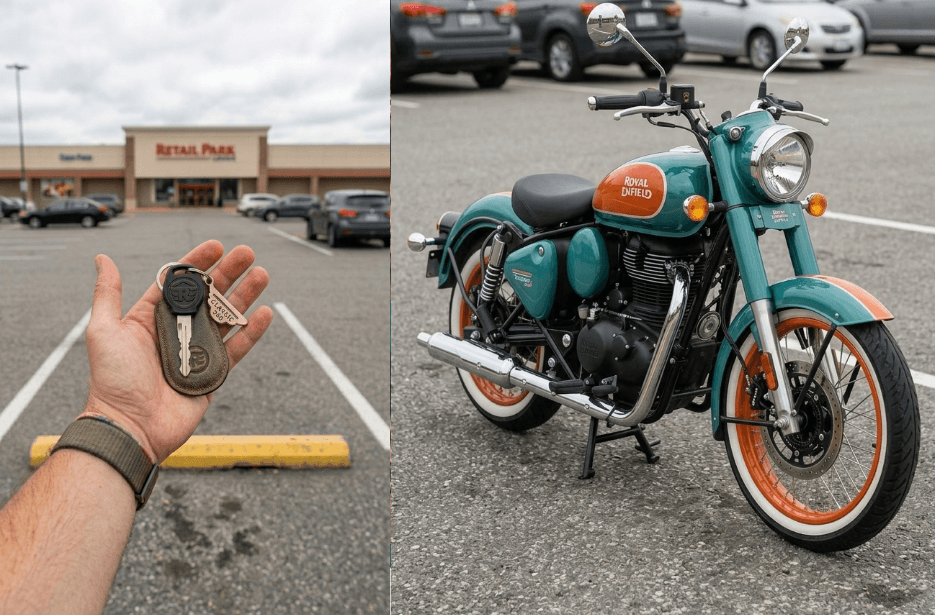
Creating eye-catching videos doesn’t have to be complicated anymore. With the help of Google Flow, you can turn simple images into amazing visual transformations. In this guide, you will learn how to create a unique video where a bike key smoothly transforms into a fully assembled motorcycle. It is quick, creative, and perfect for sharing on platforms like Instagram or YouTube. Just follow the steps, use the prompt, and watch your idea come to life.
The video is composed in a vertical 9:16 aspect ratio (Instagram/Reels format). The camera is completely static and locked-off—no zoom, no pan, no tilt, no dolly movement. The framing is set wide from the beginning, with the camera positioned slightly farther away so the entire motorcycle fits fully within the frame at all times. The subject remains centered, and no part of the bike is ever cropped.
As the key nears the ground, it seamlessly morphs into a rotating motorcycle front tyre (matching the motorcycle design from the reference image). Upon contact, a soft, realistic burst of dust spreads outward, interacting naturally with the ground surface from the reference.
From outside the frame, motorcycle components begin entering one at a time in a strict, controlled sequence—each part accurately matching the reference motorcycle in shape, proportion, material, and finish. The assembly proceeds step-by-step: first the fuel tank, then the rear tyre, followed by the frame, suspension, engine, and exhaust. Next, smaller elements arrive—handlebars, seat, body panels, cables, bolts, and fine details—each rotating, aligning, and attaching individually with precise mechanical motion.
Only one major component attaches at a time, ensuring a clean, sequential build. All motion is enhanced with subtle motion blur, realistic air displacement, and ground dust reacting dynamically to each movement, while maintaining visual consistency with the reference environment.
The assembly accelerates slightly toward completion, maintaining perfect continuity. The final result seamlessly transitions into a fully assembled, photorealistic motorcycle that matches the uploaded reference image exactly in every detail—angle, lighting, materials, and surroundings.
Throughout the entire video, the full motorcycle remains completely visible within the frame, centered with comfortable spacing around it, as dust gently settles and the scene comes to rest. No camera movement occurs at any point.
Google Flow Generated Video:
How to Create a Key-to-Bike Transformation Video
1. Take a photo of your bike key in your hand, and another clear photo of your bike.
2. Go to the Google Flow website and click “+ New Project.”
3. In the prompt box, switch from Image to Video. Then select Frames and set the size to 9:16 (vertical).
4. Upload your images, add the key photo in “Start” and the bike photo in “End.”
5. Copy the prompt from the article and paste it into the prompt box.
6. Click the Generate (arrow) button. Wait a few minutes, your transformation video will be ready.
Tips to Make the Final Video Better
- Use a high-quality key photo with clear lighting; this improves the transformation accuracy.
- Make sure both images have similar backgrounds and lighting for a smoother transition.
- Keep the bike centred and fully visible in the frame to avoid cropping issues.
- Avoid cluttered backgrounds; clean, simple scenes give better results.
- If the first result isn’t perfect, regenerate or tweak the prompt slightly.
- Add subtle background music or sound effects after generation to enhance the final video.
- Export in high resolution (HD or higher) for better quality on platforms like Instagram Reels.