

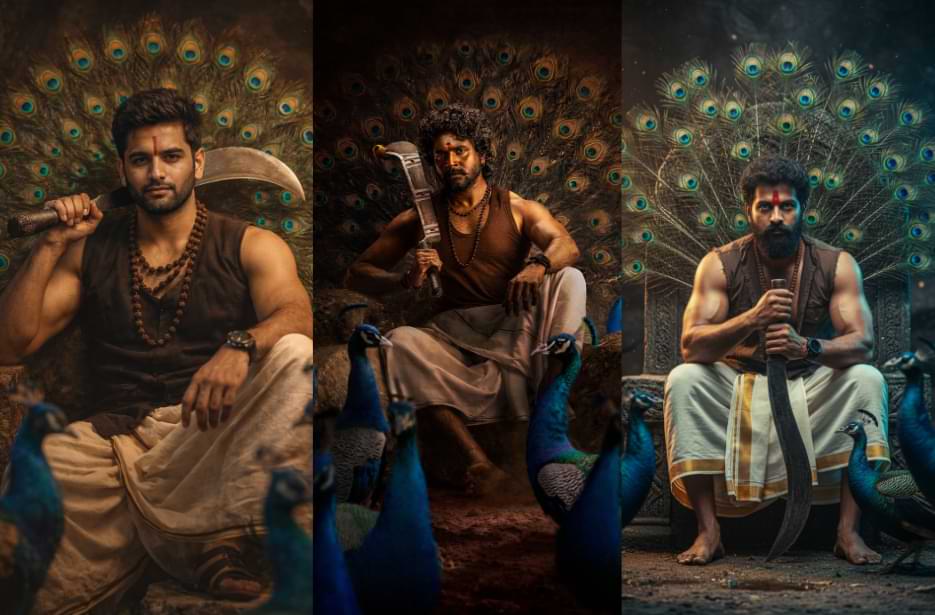
The first look of Sivakarthikeyan’s latest movie Seyon has grabbed everyone’s attention with its stunning mass hero poster. Moreover, the powerful styling, dramatic lighting, and royal warrior vibe make the look truly eye-catching. If you want to see yourself in a similar cinematic style, this article has the perfect prompts for you. Just copy your favourite version and generate your own epic poster using your preferred AI tool.
We have shared multiple prompt variations so you can try different styles and pick what suits you best. Simply upload your photo, run the prompt, and create a bold movie-style image in minutes. The process is easy even for beginners, and the results look highly professional. Try it now and share your mass hero look with your friends.
Seyon Movie First Look Prompts
Create powerful cinematic warrior portraits with deep, dramatic lighting and mass hero energy. These prompts help you generate ultra-realistic AI posters with a strong South Indian movie vibe.
Version 1: Cinematic Lighting Hero Portrait
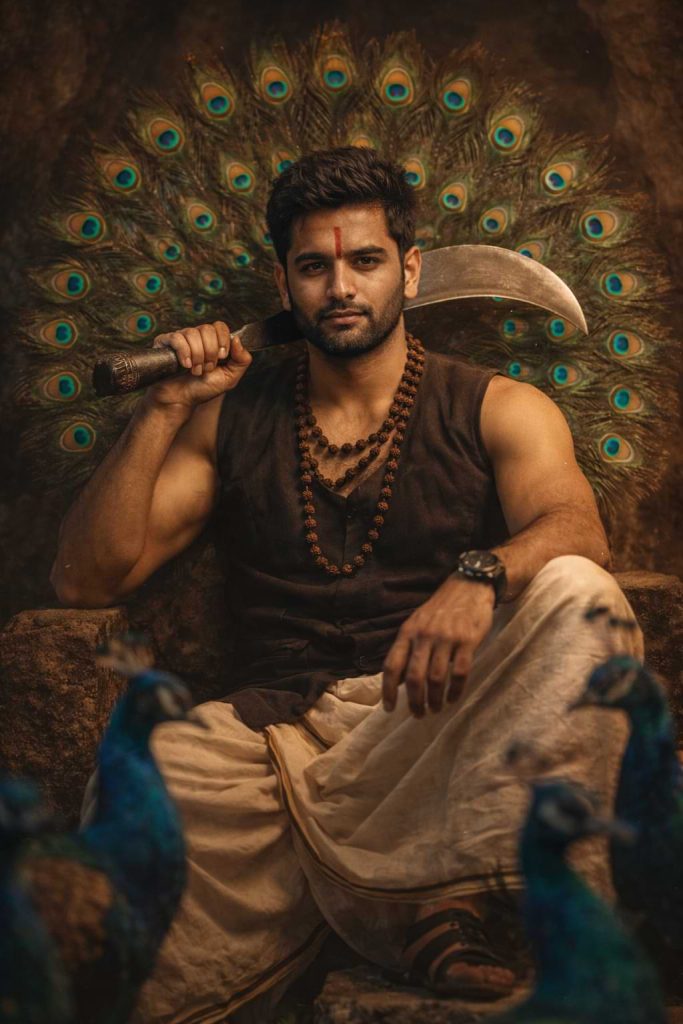
Version 2: Epic Depth & Rim Light Hero Illustration
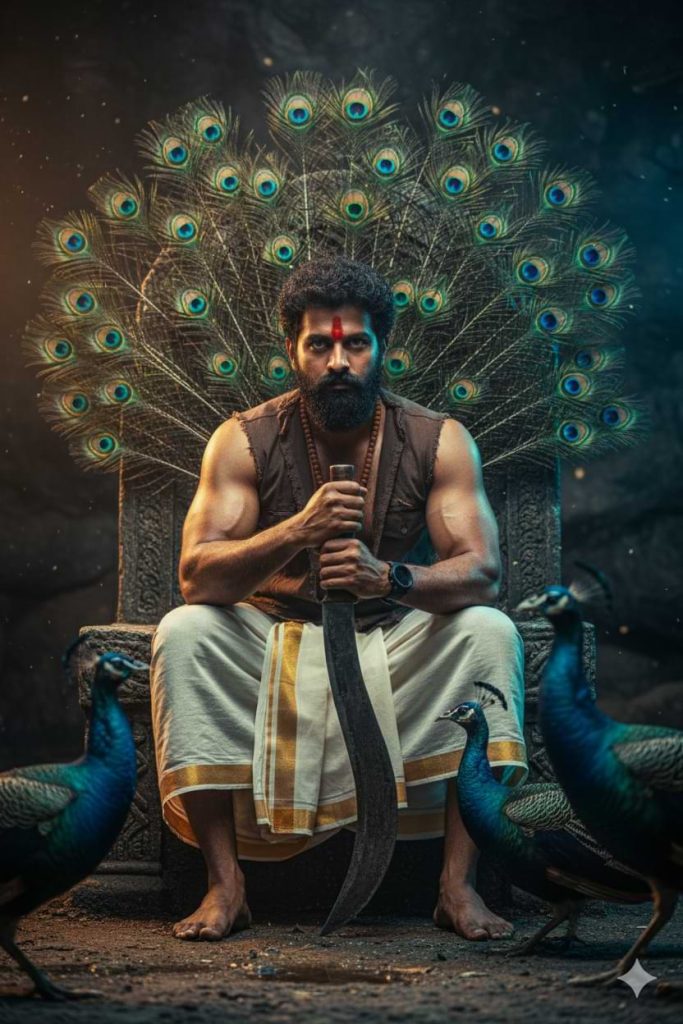
He is leaning slightly forward with elbows resting on his knees, torso angled toward camera, gripping a large traditional curved aruval vertically with both hands, blade tip resting on the ground between his feet. His head is slightly tilted downward while his eyes look up intensely at the camera — dominant, fierce, commanding presence.
Replace ONLY the face with the face from my reference image. Maintain exact facial structure, beard density, hair texture, expression accuracy, and natural skin realism from the reference. Adjust complexion subtly to match the dusky body tone while preserving realism. Seamless blend with dramatic shadow depth and warm rim lighting.
Appearance details:
Thick curly black hair, slightly longer and textured
Full rugged dense beard
Bold red tilak across forehead (slightly wider)
Strong muscular forearms with visible veins
Dark brown sleeveless rugged cotton vest
Traditional off-white dhoti with gold border
Rudraksha mala layered twice around neck
Black wristwatch with matte strap
Background:
Instead of a perfect symmetrical fan, create a slightly asymmetrical peacock feather explosion behind him — feathers spreading outward like a divine energy burst. Deep emerald greens, teal blues, and gold iridescent eyes glowing subtly in the darkness. Slight motion in feathers as if touched by air.
Foreground:
Three peacocks closer to camera — one partially blocking frame left, one blurred crossing frame right, one sharp near throne base. Strong depth layering.
Lighting:
Low-key dramatic cave lighting
Strong warm top-left rim light
Subtle cool blue fill from right for contrast
Dust particles illuminated in light beam
Heavy shadow sculpting on arms and jawline
Cinematic brown-teal grading
Color Grade:
High contrast
Deep blacks
Warm highlights
Saturated peacock tones
HDR cinematic finish
Camera:
85mm lens
f/1.4 aperture (shallower DOF)
Slight low-angle perspective for dominance
Ultra detailed skin texture
Sharp focus on eyes
Soft feather bokeh background
Style:
Ultra photorealistic, 8K cinematic poster, South Indian mass hero aesthetic, mythic tribal warrior energy, intense royal presence, dark fantasy realism.
Negative Prompt:
cartoon, anime, glossy skin, plastic texture, artificial blending, low resolution, extra fingers, distorted hands, flat lighting, overexposed highlights
Version 3: High-Contrast Dramatic Warrior Portrait
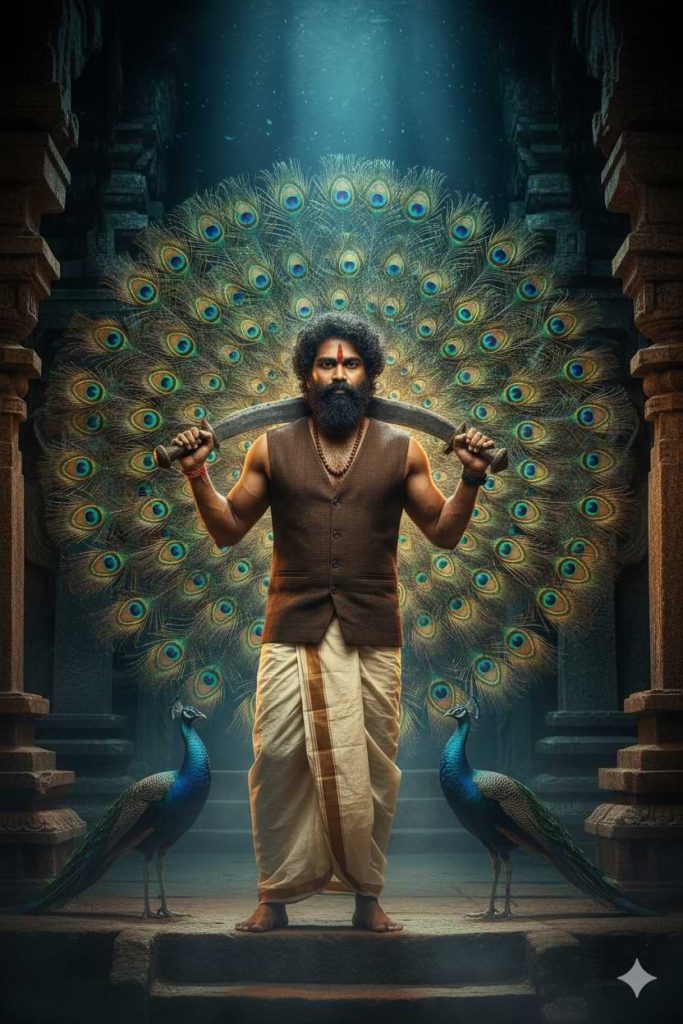
He holds a large traditional aruval resting across his shoulders behind his neck, both hands gripping the handle ends casually yet powerfully. His posture is relaxed but authoritative — calm warrior energy.
Replace ONLY the face with the face from my reference image. Preserve exact facial structure, natural beard style, hair texture, and authentic skin tone from reference. Blend seamlessly with dramatic warm cinematic lighting and realistic shadow depth.
Appearance:
Thick slightly wind-swept curly black hair
Full rugged beard
Sharp vertical red tilak on forehead
Muscular arms highlighted by rim light
Dark brown sleeveless vest with subtle texture
Traditional cream dhoti flowing naturally
Single rudraksha necklace
Black wristwatch
Barefoot standing on stone
Background:
A perfectly symmetrical, massive peacock feather halo filling the entire frame behind him like a divine mandala. Feathers hyper-detailed with glowing emerald, teal, sapphire, and gold eye patterns. Very crisp and radiant.
Foreground:
Two peacocks on either side facing inward toward him. Their necks illuminated with subtle blue highlights. Slight ground mist around feet.
Lighting:
Dramatic temple torch lighting
Warm amber side lighting from left
Subtle cool moonlight beam entering from cave opening behind
Light rays cutting through dust
Soft cinematic vignette
Balanced warm/cool contrast
Color Grade:
Teal and amber LUT
Deep cinematic blacks
Warm skin highlights
Rich peacock saturation
Slight golden glow around halo feathers
Camera:
85mm lens
f/1.8
Eye-level framing
Symmetrical centered composition
Razor sharp focus on face
Soft blur on background edges
Hyper realistic textures
Style:
Ultra photorealistic, 8K cinematic film still, mythic royal warrior guardian, divine aura aesthetic, South Indian epic mass hero style, dark temple realism.
Negative Prompt:
anime, illustration, CGI look, plastic skin, flat lighting, artificial face merge, distorted anatomy, oversharpened, washed colors
How to Use These Prompts
1. Below each image, you will see a prompt box with two buttons: Copy and Share to AI.
2. You can tap Copy to copy the full prompt manually. Or simply tap Share to AI; this will automatically copy the prompt for you.
3. After tapping Share to AI, a list of popular AI tools like ChatGPT, Gemini, Copilot, and others will appear on your screen.
4. Click on any AI tool you prefer. It will directly open the selected AI platform.
5. Once the AI page opens, paste the prompt into the prompt box (it is already copied if you used Share to AI).
6. Upload your reference image if required.
7. Click generate, and your image will be created.
8. If needed, you can slightly adjust the prompt for lighting, angle, or mood and generate again.
9. Once you are satisfied with the result, download the image and save it for your use.
Customisation Tips
- Upload a sharp, front-facing photo for accurate face blending.
- Adjust vest or dhoti colours to match your preferred hero look.
- Add “extra dramatic lighting” if you want a stronger mass effect.
- Use “more dust particles” for a gritty cinematic feel.
- Increase or reduce “shadow depth” based on mood preference.
- Try both low-angle and eye-level wording for different hero impact.
- Add “strong rim light” to enhance body definition.
- Modify peacock feather intensity for either a subtle or grand background.
- Generate multiple versions to find the most realistic result.
- Keep the reference image high resolution for the best output quality.