

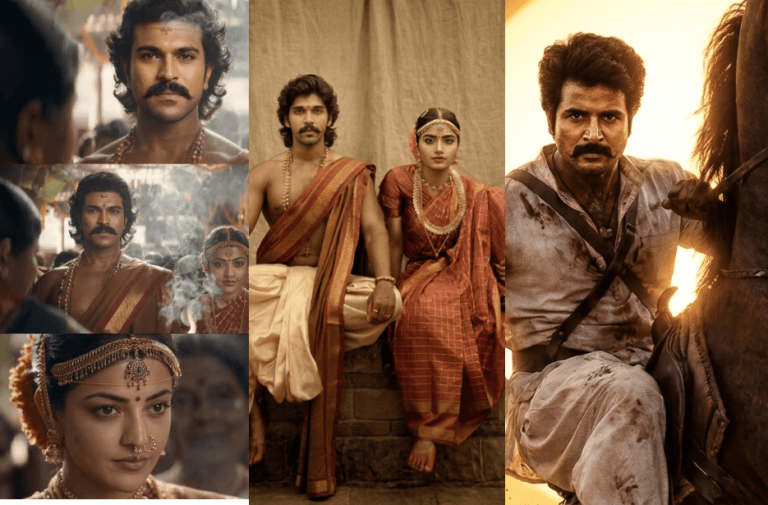
The traditional couple portrait and wedding scenes from the movie Ranabaali are getting huge attention, with many people already recreating these iconic moments. If you want to recreate the famous wedding scenes from Vijay Deverakonda and Rashmika Mandanna’s movie Ranabaali, you can easily do it with AI image generators. Here you’ll find AI Prompts to recreate diverse scenes using your own photos with your favourite AI image generation tool.
Version 1: Ranabaali Historical Couple Portrait Scene
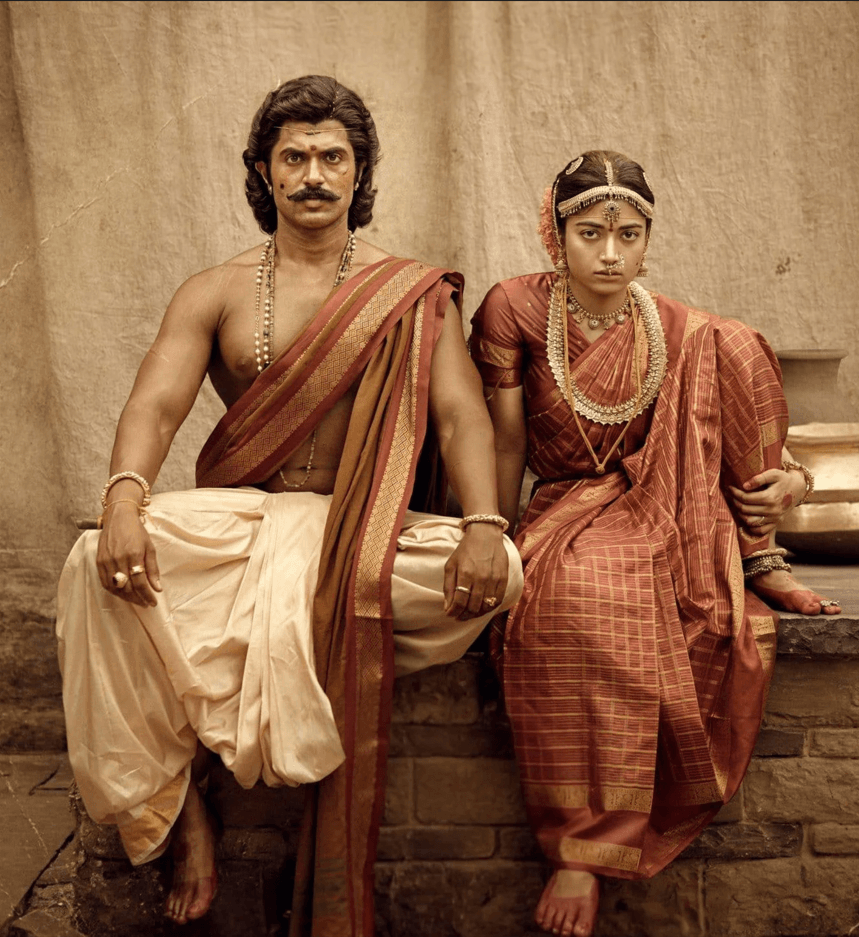
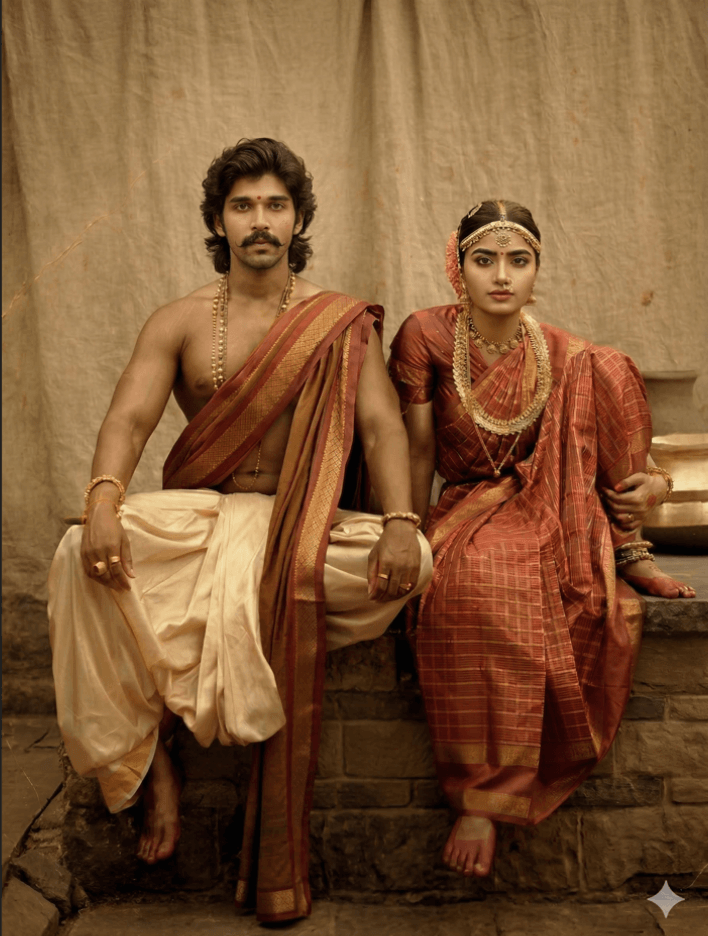
The scene is a warm sepia-toned historical portrait with soft diffused lighting and a neutral beige cloth backdrop. Two people sit side-by-side on a low stone platform.
Man (left side):
Sitting upright with legs apart in a strong, composed posture.
Wearing a cream dhoti and a reddish-brown shawl with a gold border draped over one shoulder.
Wearing bead necklaces, rings, and a bracelet.
Medium-length wavy hair and a thick mustache.
The mustache must remain exactly the same as in the reference image and must NOT be changed or removed.
Woman (right side):
Sitting close beside the man with a calm, serious expression.
Wearing a red traditional silk saree with gold borders and check patterns.
Adorned with traditional gold jewelry including layered necklaces, earrings, a nose ring, bangles, and a maang tikka.
All jewelry must remain exactly the same as in the reference image and must NOT be altered or replaced.
Face Swap Requirements:
Replace only the faces using the provided photos.
Match head angle, expression, lighting, shadows, skin tone, and perspective so the faces blend naturally with the bodies.
Maintain high realism and accurate identity matching.
Important:
Keep the background cloth, stone platform, clothing, accessories, pose, and composition unchanged.
Maintain the same vintage sepia historical portrait style.
Version 2: Ranabaali Wedding Scene
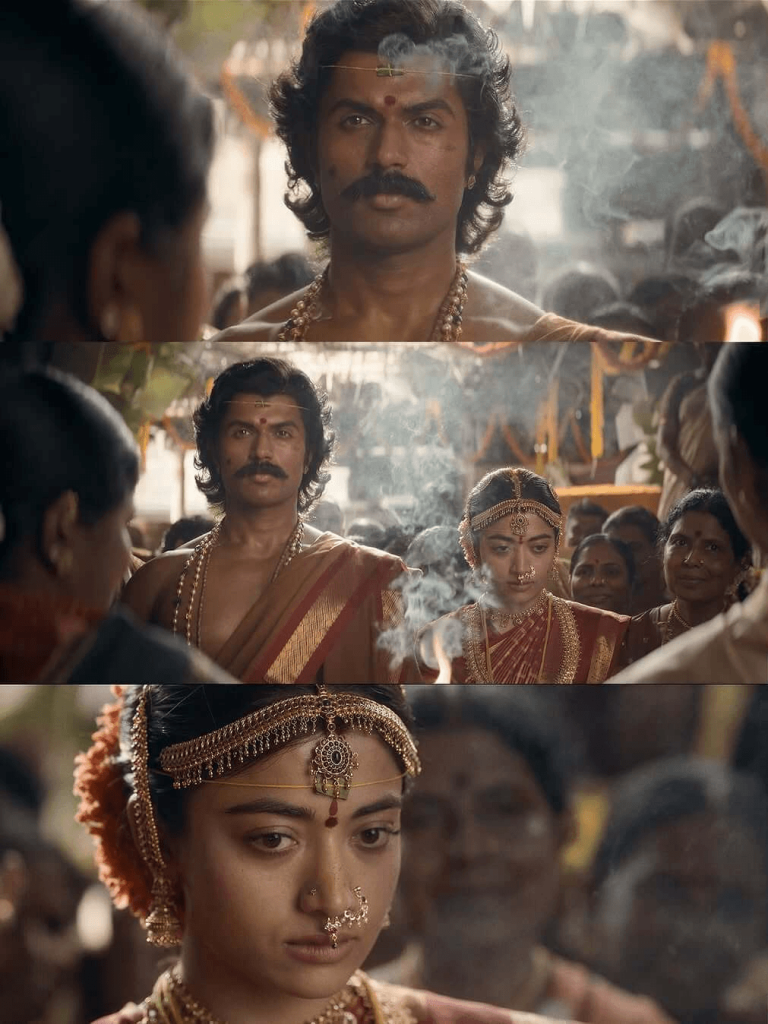
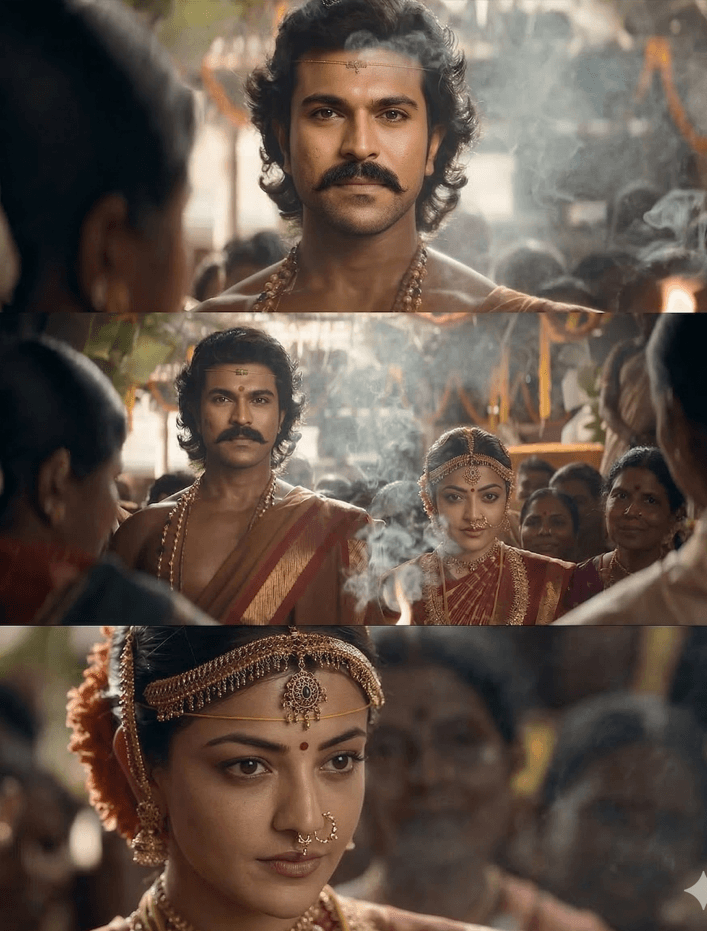
Recreate the same dramatic South Indian temple wedding scene while swapping the groom’s face with the man from the second image and the bride’s face with the woman from the third image. The face identity must remain accurate, recognizable, and naturally blended with the bodies.
Scene Description
A cinematic South Indian wedding ritual inside a temple-like setting with warm golden lighting, incense smoke rising in front of the couple, and a crowd of wedding guests surrounding them. Traditional decorations hang in the background with soft depth-of-field blur.
Groom
Standing upright at the center with a calm, serious expression.
Wearing a cream dhoti and reddish-brown angavastram with gold borders draped over one shoulder.
Wearing multiple bead necklaces and traditional ornaments.
Medium-length wavy hair and a thick mustache.
Important: Keep the mustache exactly the same as the reference image. Do not alter, remove, or replace it.
Bride
Standing slightly beside the groom with a calm and emotional expression during the ritual.
Wearing a rich red silk saree with gold borders.
Adorned with traditional South Indian bridal jewelry, including layered gold necklaces, earrings, bangles, a nose ring, and a maang tikka / head ornament.
Important: All jewelry must remain exactly the same as the reference image and must not be changed or replaced.
Environment
Incense smoke drifting upward between the couple.
Guests and family members watching the ceremony around them.
Warm golden cinematic lighting with film-like color grading.
Soft background blur and dramatic atmosphere.
Face Swap Instructions
Replace only the faces of the bride and groom using the provided photos.
Match head angle, facial expression, lighting, shadows, skin tone, and perspective so the faces blend naturally with the bodies.
Preserve all costumes, jewelry, smoke, crowd placement, decorations, and camera framing exactly as in the reference image.
Maintain high realism, cinematic detail, and accurate identity matching.
Version 3: Ranabaali Warrior Horse Battle Scene
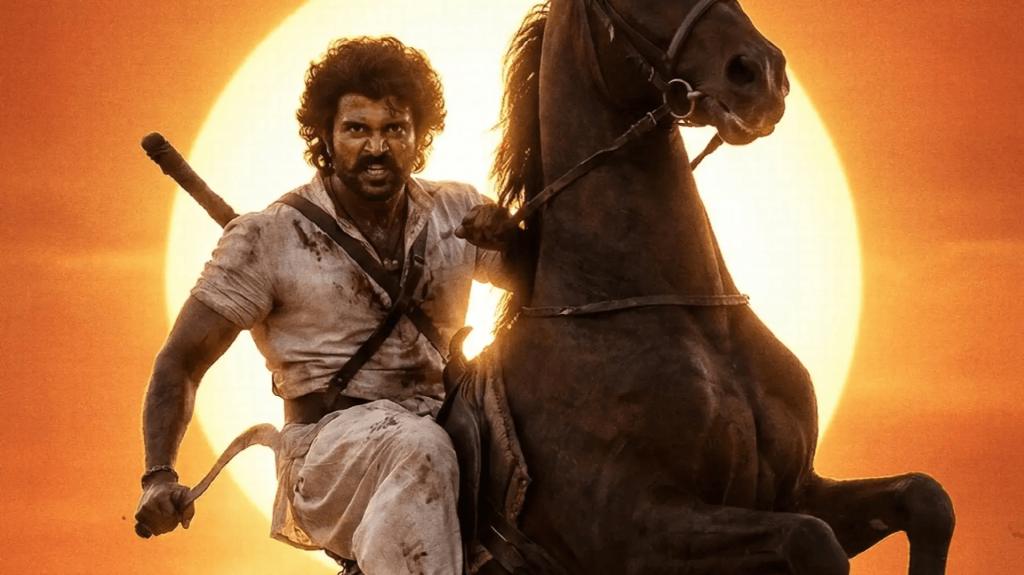
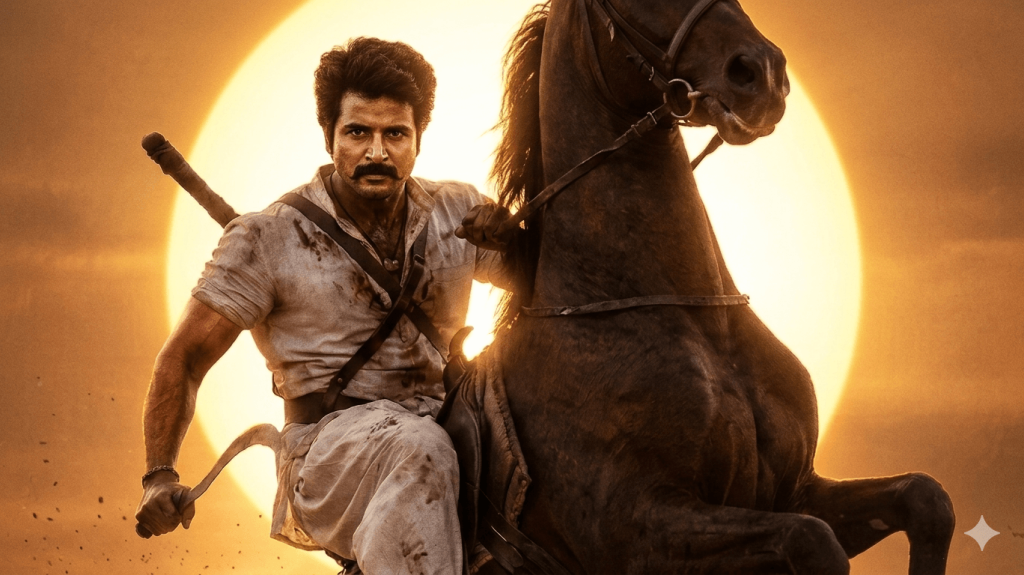
Scene
An intense cinematic warrior riding a rearing dark brown horse in a powerful action pose. The horse rises dramatically on its hind legs while the warrior grips the reins with one hand and holds a curved blade weapon in the other. A massive glowing sun fills the background, creating a strong golden-orange halo and dramatic silhouette.
Warrior
Sitting firmly on a rearing horse in a heroic battle pose
Wearing rugged warrior clothing: off-white dhoti-style lower garment and a worn shirt with dust and battle stains
A weapon strap across the chest with a weapon visible behind the shoulder
Holding a curved blade weapon in one hand
Strong muscular posture with a fierce, determined expression
Horse
Dark brown horse standing on hind legs in a dramatic rearing pose
Visible powerful muscles and cinematic lighting highlights
Lighting & Cinematic Style
Huge golden sun directly behind the warrior and horse creating a glowing halo effect
Warm orange sunset color grading
Dramatic high-contrast lighting with dust, heat haze, and cinematic atmosphere
Epic historical action movie poster style
Face Replacement Instructions
Replace only the warrior’s face with the face from the provided photo
Preserve the exact mustache, facial features, and identity from the provided face image
Match head angle, lighting direction, shadows, skin tone, and perspective so the face blends naturally with the body
Maintain high realism and accurate identity matching
Important
Keep the horse pose, sun position, weapon, clothing, body posture, and framing exactly the same as the reference image
Preserve the dramatic cinematic atmosphere and epic film-poster look
Version 4: Ranabaali Cinematic Portrait
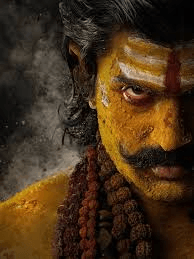
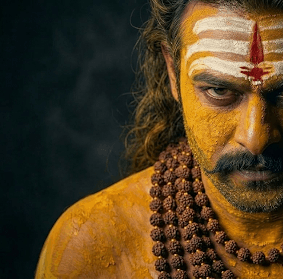
Scene
A dark, dramatic cinematic portrait of a Shiva devotee. Only half of the face is visible in strong light, while the other half fades into deep shadow. The background is dark with swirling smoke, creating a mysterious and powerful spiritual atmosphere.
Appearance
Face and upper body covered in yellow turmeric / sandalwood paste
White horizontal sacred ash (vibhuti) stripes on the forehead
Red vertical tilak in the center of the forehead
Thick mustache and intense gaze
Wearing multiple Rudraksha bead necklaces
Slightly rugged skin texture giving a spiritual warrior / ascetic appearance
Lighting
Low-key cinematic lighting
One side of the face strongly illuminated while the other fades into darkness
High contrast shadows
Dark smoky background with subtle mist
Dramatic cinematic color grading
Face Replacement Instructions
Replace only the face of the devotee with the face from the provided photo
Preserve the exact facial identity and features
Match head angle, lighting direction, shadows, skin tone, and perspective
Blend the face naturally with the turmeric-painted body
Important
Keep the same turmeric paint, vibhuti stripes, red tilak, Rudraksha beads, lighting direction, smoke, framing, and dramatic half-shadow composition exactly like the reference image
Maintain the same intense cinematic portrait styleUse the first image as the exact visual reference for composition, pose, framing, lighting, background, textures, colors, and cinematic style. Recreate the same intense portrait while replacing the devotee’s face with the face from the second photo I provide, ensuring the face identity remains clearly recognizable and blends naturally with the body.
How to Use These Prompts
1. Below each image, you will see a prompt box with two buttons: Copy and Share to AI.
2. You can tap Copy to copy the full prompt manually. Or simply tap Share to AI; this will automatically copy the prompt for you.
3. After tapping Share to AI, a list of popular AI tools like ChatGPT, Gemini, Copilot, and others will appear on your screen.
4. Click on any AI tool you prefer. It will directly open the selected AI platform.
5. Once the AI page opens, paste the prompt into the prompt box (it is already copied if you used Share to AI).
6. Download the original reference image of the song from the article, then upload both the reference image and your own photo to the AI tool.
7. Click generate, and your image will be created.
8. If needed, you can slightly adjust the prompt for lighting, angle, or mood and generate again.
9. Once you are satisfied with the result, download the image and save it for your use.
Customization Tips
You can slightly modify the prompts to get even better results depending on the AI tool you use.
1. Adjust Lighting
If the image appears too dark or too bright, add instructions like: “enhance cinematic lighting” or “soft natural lighting.”
2. Improve Face Matching
If the face swap does not look natural, include phrases like: “highly detailed face match” or “accurate facial identity preservation.”
3. Enhance Cinematic Style
To make the image look more dramatic, add styles such as: “epic cinematic color grading,” “film poster style,” or “ultra-realistic lighting.”
4. Adjust Camera Perspective
You can modify the viewing angle with phrases like: “slight low-angle shot,” “close-up cinematic portrait,” or “wide cinematic framing.”
5. Increase Image Quality
For sharper results, add quality terms like: “high detail,” “8K resolution,” or “ultra realistic textures.”
6. Experiment with Multiple Generations
Sometimes the best result appears after a few tries. Generate the image multiple times and pick the version you like the most.
0 Comments