

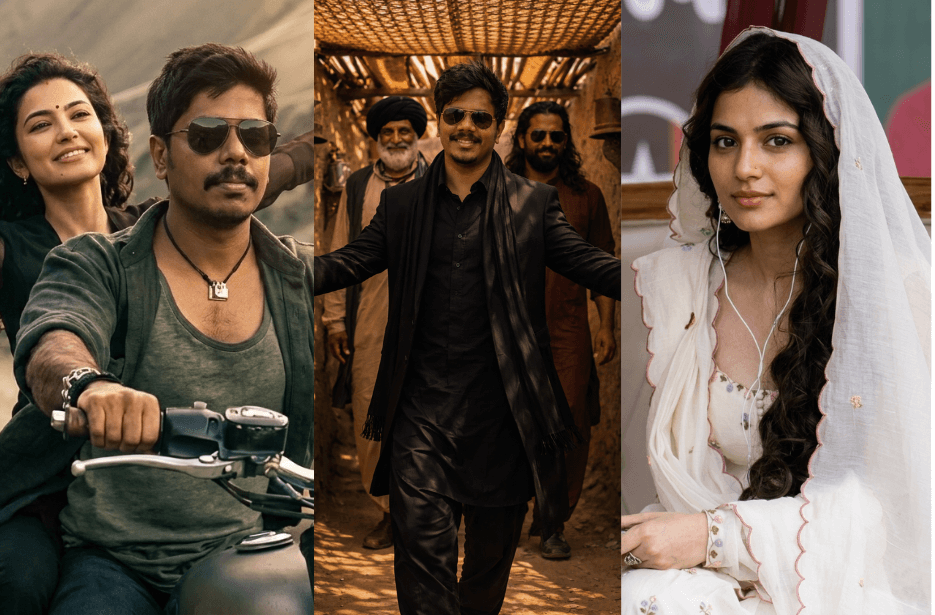
The classy look of Akshaye Khanna from the Dhurandhar: Sher-e-Baloch entry song has gone viral across social media. Interestingly, this is one of the first times people are recreating a villain’s stylish look from a movie using AI.
If you also want to recreate Akshaye Khanna’s classy black suit look from Dhurandhar, simply copy the prompts given below and paste them into your favourite AI image generation tool to create your own powerful gangster-style portrait.
You will also find prompts to recreate the beautiful white salwar look of Sara Arjun and the cinematic bike ride scene featuring Sara Arjun and Ranveer Singh from the movie.
Version 1: Akshaye Khanna’s Desert SUV Entry Scene
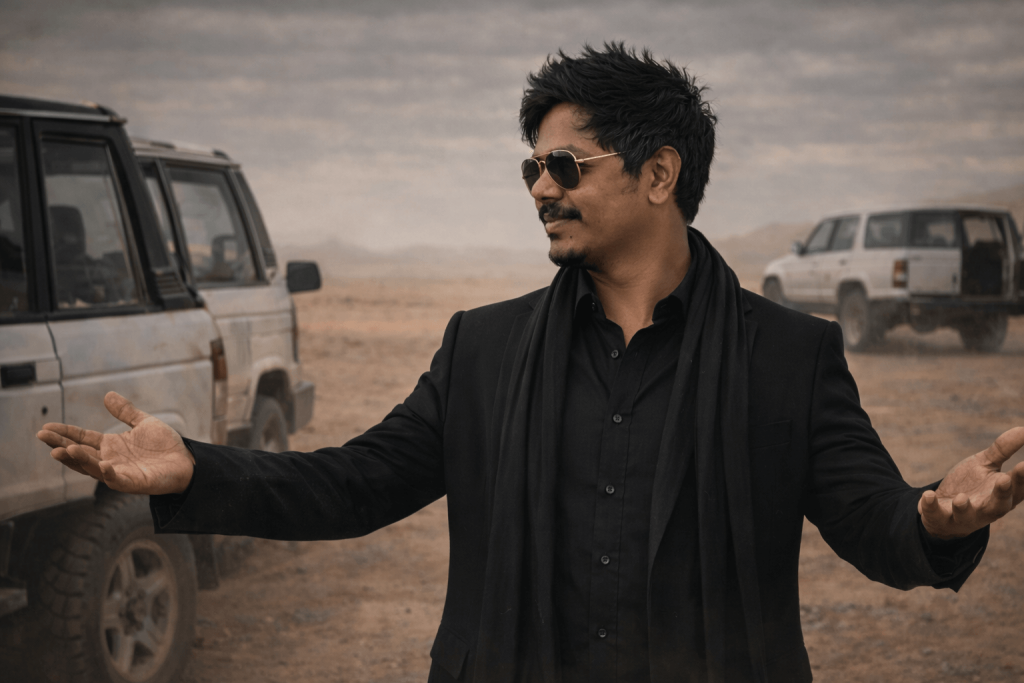
Pose: relaxed and charismatic stance with both arms slightly extended outward and palms open, expressing calm confidence and authority. Facing left side down with a casual smile on face.
Environment: wide sandy desert landscape with soft dunes and a muted cloudy sky. Another SUV is visible in the background. Dusty desert atmosphere with natural wind and subtle sand particles in the air.
Lighting: natural soft daylight with warm cinematic color grading, realistic shadows and highlights, dramatic movie-style lighting.
Camera: eye-level cinematic shot, DSLR look, 85mm lens, shallow depth of field, subject sharply in focus while the background SUVs and desert are slightly blurred.
Style: cinematic movie still, ultra-detailed textures, realistic skin tones, professional film color grading, dramatic composition.
Aspect ratio: 9:16 vertical, 8K ultra-realistic, photorealistic cinematic photography.
Version 2: Akshaye Khanna’s Sher-e-Baloch Alley Entry Scene
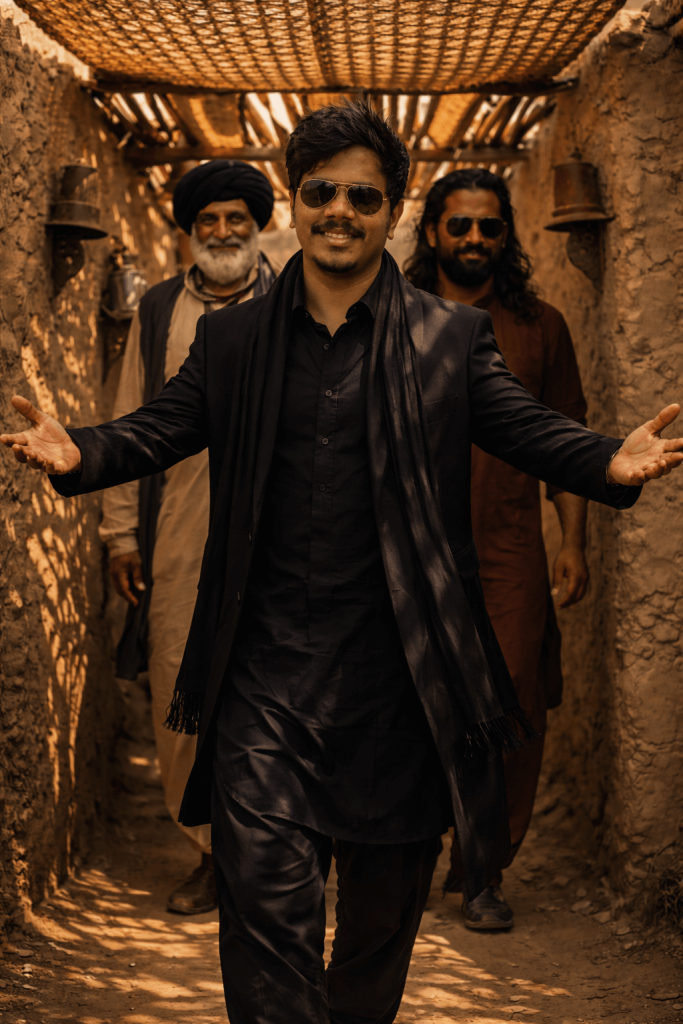
The man walks toward the camera with a charismatic smile and both arms stretched outward in a welcoming “hero entry” pose. He wears an elegant all-black outfit: black kurta-style suit, long black coat, and a long black scarf flowing down the front. He is wearing dark aviator sunglasses. His hair is thick, wavy, and styled with volume, giving a rugged cinematic look.
Behind him, two men follow slightly blurred, wearing traditional Middle Eastern clothing, adding depth and a powerful entourage vibe.
Lighting: warm golden sunlight filtering through the canopy, creating strong cinematic shadow patterns on the walls, floor, and characters.
Environment details: dusty ground, rustic clay textures, warm desert tones, traditional village alley atmosphere.
Camera: cinematic low eye-level shot, 50mm lens, shallow depth of field, subject sharply focused while the background characters are slightly blurred.
Style: movie still, dramatic hero introduction scene, ultra-detailed textures, natural skin tones, cinematic color grading.
Aspect ratio: 9:16 vertical, 8K ultra-realistic, photorealistic cinematic photography.
Version 3: Akshaye Khanna’s Sher-e-Baloch Adab Entry Scene
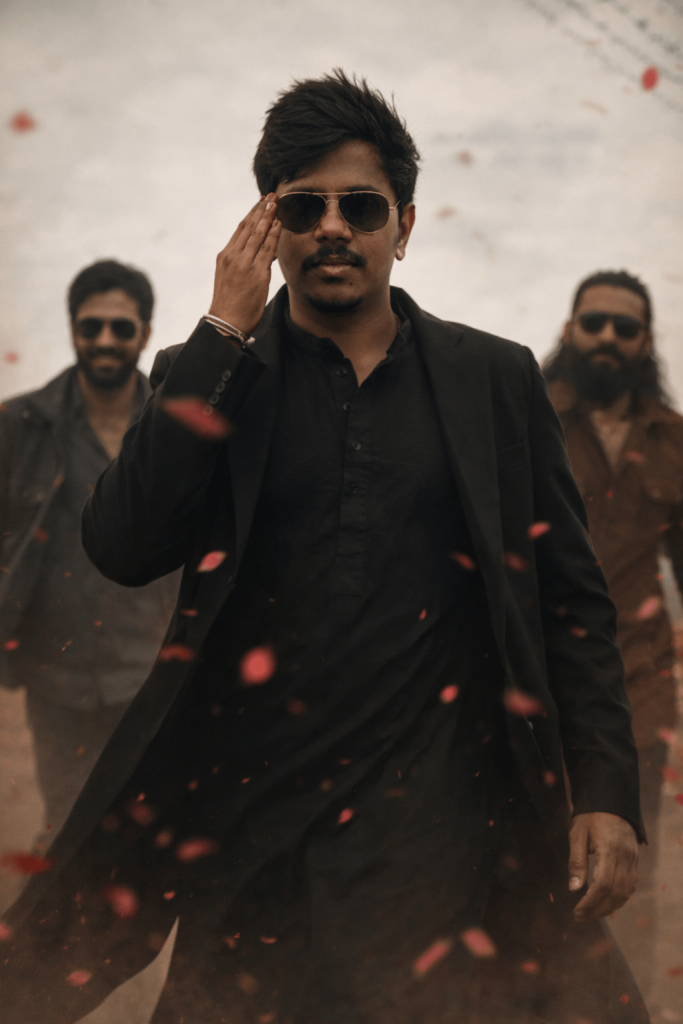
The man is walking confidently toward the camera in a powerful hero-entry pose, doing the adab sign with one hand near his face while walking forward.
He is wearing a black kurta with a long black coat, creating a sleek and dominant action-hero appearance.
Composition
Low-angle cinematic shot showing mid-walk motion, giving the character a powerful and dominant presence.
Supporting Characters
Two men walk slightly behind him as his entourage, wearing dark outfits and sunglasses, slightly blurred to create depth and emphasize the main character.
Environment
Outdoor dusty cinematic environment with soft neutral background tones.
Red flower petals floating in the air, creating a dramatic slow-motion movie moment.
Lighting
Warm cinematic lighting with soft highlights and shadows, giving a mass-hero movie atmosphere.
Camera
Professional cinematic photography
Shot on Canon EOS R5
85mm lens
f/2.8 aperture
shallow depth of field
sharp focus on the main character
background softly blurred
Style
ultra-realistic, cinematic hero entry, action movie scene, dramatic lighting, photorealistic skin texture, blockbuster film still, 8k detail
Aspect Ratio
9:16 vertical
Negative Prompt
cartoon, CGI, distorted face, extra arms, extra fingers, blurry face, oversmoothed skin, unrealistic lighting
Version 4: Sara Arjun’s White Salwar Intro Scene
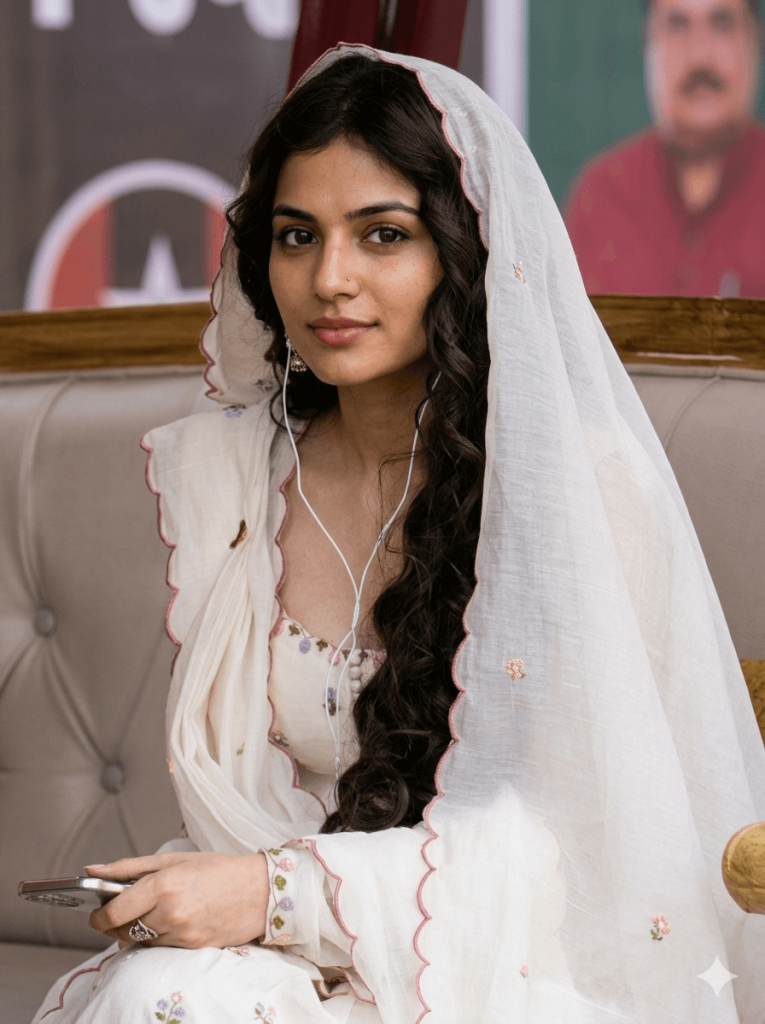
She is seated on a light gray tufted sofa indoors, body slightly angled but looking directly at the camera with a calm, serene expression.
She wears a soft white traditional kurta and a sheer white dupatta draped over her head, the dupatta having delicate floral embroidery and a thin pink scalloped border. The kurta features small purple and green floral embroidery on the sleeve cuff and neckline.
Her long dark hair is styled in loose curls falling over one shoulder beneath the dupatta.
White wired earphones are in her ears, with the cable running naturally down the front of her clothing.
Her hands rest in her lap holding a smartphone, and she wears a simple silver ring.
Environment
A softly blurred indoor background with wooden trim and part of a wall poster or framed artwork showing a man in a red shirt. Warm neutral tones create a cozy atmosphere.
Lighting
Soft natural indoor light from the side, gentle shadows, realistic skin tones, cinematic softness emphasizing the fabric texture and embroidery details.
Camera
Professional DSLR photography
Canon EOS R5
85mm portrait lens
f/1.4 aperture
shallow depth of field
sharp focus on the eyes
natural color grading
Style keywords
ultra-realistic, cinematic portrait, traditional Indian aesthetic, photorealistic skin texture, natural lighting, high detail, 8k
Aspect ratio: 3:4 vertical
Negative prompt
cartoon, painting, CGI, plastic skin, distorted face, extra fingers, blur, oversharpened skin, artificial lighting
Version 5: Ranveer Singh & Sara Arjun – Mountain Bike Ride Scene
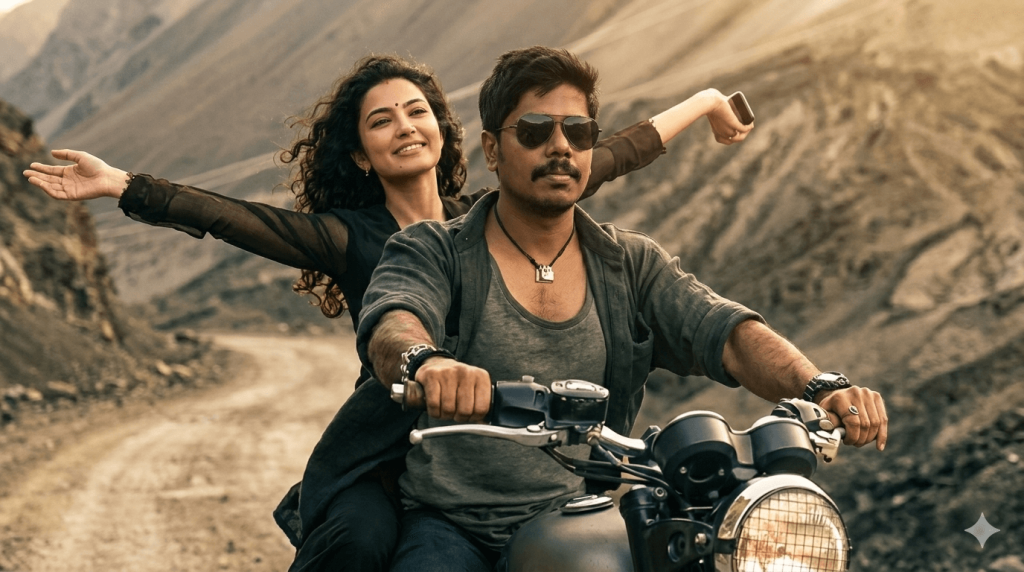
The man is driving the motorcycle, sitting confidently at the front. He has a thick beard and mustache, medium-length styled hair, and wears dark aviator sunglasses. He is dressed in a dark green t-shirt layered with a rugged open jacket, wearing bracelets and a small pendant necklace. His hands are gripping the handlebars of the motorcycle.
Behind him, the woman sits on the motorcycle seat, smiling joyfully with her arms stretched wide open, enjoying the ride. She has long flowing curly hair blowing in the wind and wears a dark stylish outfit with sheer sleeves, creating a carefree and adventurous feeling.
Environment
The setting is a dramatic mountainous road with rocky hills and winding terrain in the background, creating a travel adventure atmosphere. The road curves through the mountains with dusty earthy tones.
Lighting
Warm cinematic sunlight with soft highlights and natural shadows. Slight golden tone giving a movie-like travel sequence look.
Motion & Mood
Hair and clothing slightly blowing due to motion, conveying freedom, adventure, and happiness.
Camera
Cinematic DSLR shot
How to Use These Prompts
1. Below each image, you will see a prompt box with two buttons: Copy and Share to AI.
2. You can tap Copy to copy the full prompt manually. Or simply tap Share to AI; this will automatically copy the prompt for you.
3. After tapping Share to AI, a list of popular AI tools like ChatGPT, Gemini, Copilot, and others will appear on your screen.
4. Click on any AI tool you prefer. It will directly open the selected AI platform.
5. Once the AI page opens, paste the prompt into the prompt box (it is already copied if you used Share to AI).
6. Upload your reference image if required.
7. Click generate, and your image will be created.
8. If needed, you can slightly adjust the prompt for lighting, angle, or mood and generate again.
9. Once you are satisfied with the result, download the image and save it for your use.
Customisation Tips
To get the best results while using these Dhurandhar AI Prompts, you can customise a few elements based on your preferences and the capabilities of your AI image generation tool.
1. Upload a Clear Reference Photo
For realistic results, upload a high-quality front-facing photo with good lighting. A clear reference image helps the AI accurately match facial features and create a more natural-looking cinematic portrait.
2. Adjust the Outfit if Needed
You can modify clothing details in the prompt. For example, replace the black suit or kurta with other outfits such as a leather jacket, formal blazer, or traditional attire, depending on the look you want to create.
3. Change the Background or Environment
If you want a different cinematic setting, you can edit the environment section in the prompt. For instance, replace the desert background with a city street, palace courtyard, beach road, or nighttime urban scene.
4. Experiment with Camera Angles
Small changes in camera angles can dramatically affect the final image. You can try variations such as low-angle hero shots, close-up portraits, or wide cinematic frames to create different movie-style visuals.
5. Modify Lighting and Mood
Lighting plays an important role in cinematic images. You can experiment with golden sunset lighting, dramatic shadows, night lighting, or neon-style lighting to achieve a unique mood.
6. Adjust Aspect Ratio for Different Platforms
Use different aspect ratios depending on where you plan to use the image:
- 9:16 for Instagram Reels, YouTube Shorts, and TikTok
- 3:4 or 4:5 for portrait-style posts
- 16:9 for cinematic landscape visuals
7. Add Extra Cinematic Effects
To make the image look more dramatic, you can include effects such as dust particles, slow-motion flower petals, wind-blown hair, smoke, or light rays.