

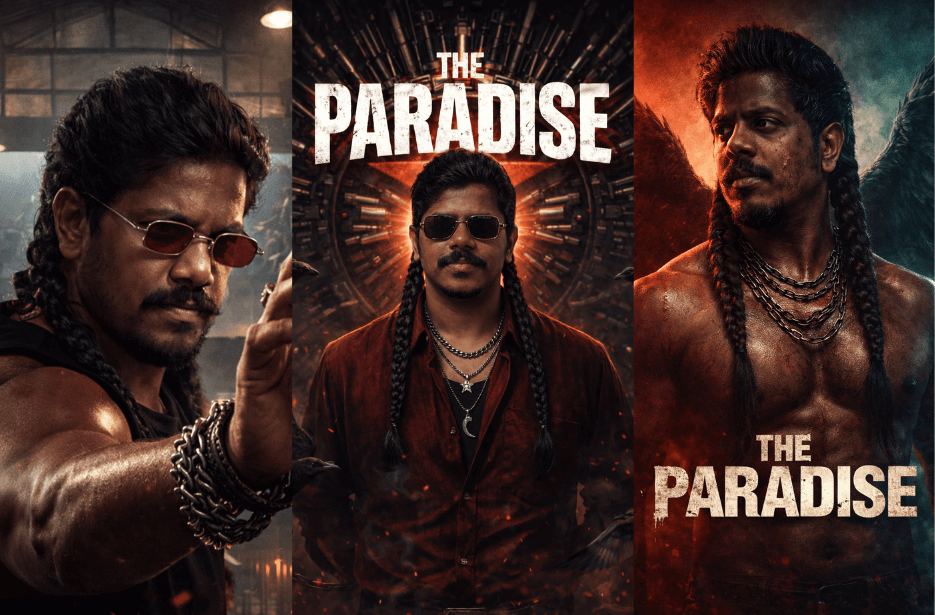
Nani’s The Paradise was expected to be released at the end of 2026. The introduction song “Aaya Sher,” composed by Anirudh Ravichander, was released on February 24, 2026, to coincide with actor Nani’s birthday.
In the song, Nani’s iconic rugged mass appearance with long hair received a huge response from fans. If you wish to recreate this powerful look, you can use the prompts given below in your preferred AI image-generation models.
Version 1: The Paradise: Throne of Steel
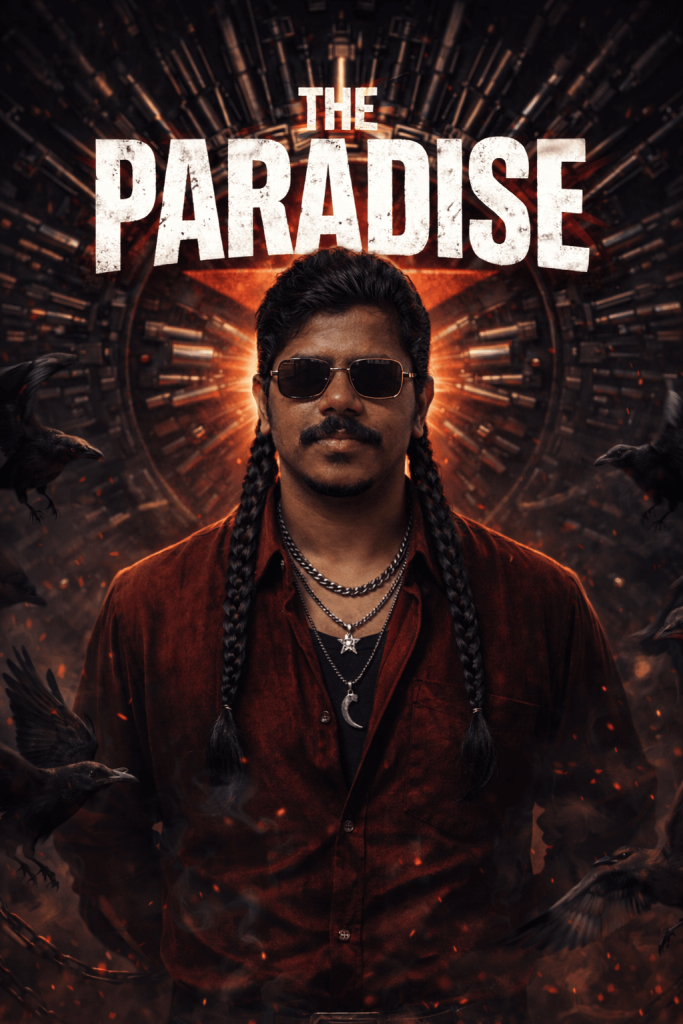
The man has beard, a distinct handlebar moustache that curves slightly downward and connects smoothly into the beard. His moustache is well-groomed but dense, adding to his fierce and commanding look, and long braided hair into two thick plaits falling over his shoulders. He wears stylish rectangular small size sunglasses with thin metallic golden rims and dark tinted lenses that reflect faint glimmers of light and shapes from the surroundings, multiple silver chains around his neck one with a star pendant and another with a crescent or claw-shaped pendant. His outfit consists of a deep red velvet or suede shirt, unbuttoned over a black undershirt, paired with dark jeans and a metal-styled belt buckle. His expression is serious and commanding, exuding strength and rebellion.
The background features a massive wheel-like structure with dozens of revolvers, rifles, and ammunition cartridges arranged symmetrically around a central red star emblem. Subtle lighting highlights the metallic textures of the weapons, reflecting cold light against the warm tones of the red circular base.
Add bold cinematic title text:
“THE PARADISE”
Crows and ravens are flying around him, symbolizing darkness and power. Some are perched on the circular structure, while others fly near the edges, their wings blurred in motion. The scene includes floating chains and smoky tendrils swirling near the bottom foreground, adding depth and mystique.
The lighting is dramatic, with a strong central spotlight on the man’s face and upper body, while the surroundings fade into deep shadows. The color palette includes dark reds, blacks, gunmetal gray, and muted gold highlights, evoking a moody, cinematic, and rebellious energy.
Version 2: The Paradise: Wings of Darkness
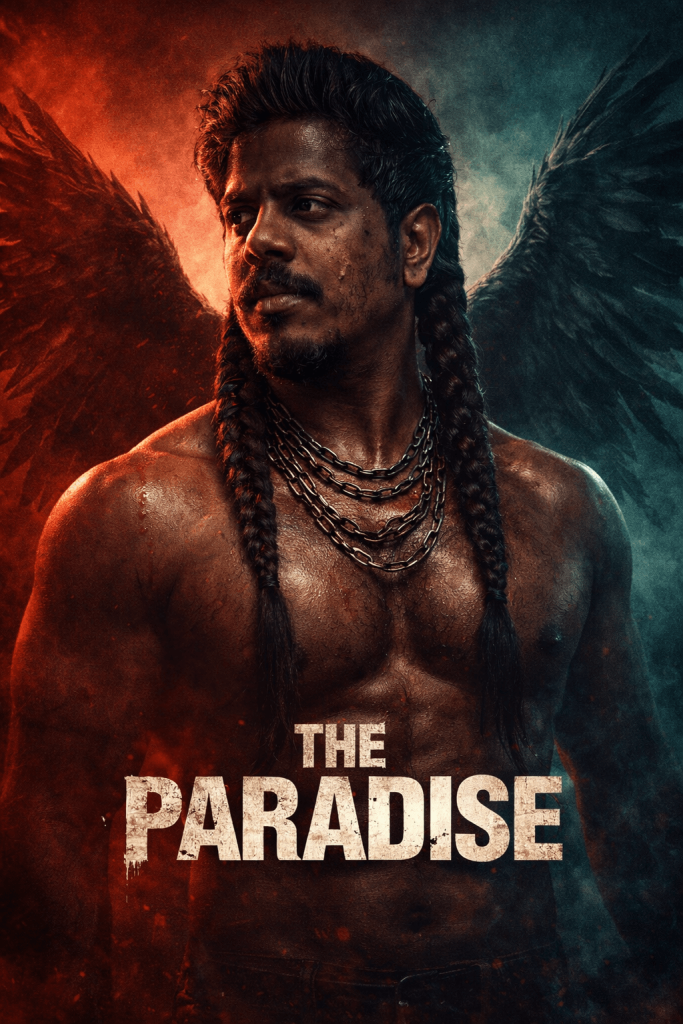
Behind him are large black raven wings spread wide, creating a striking silhouette. The background is a split cinematic gradient of deep crimson red and dark teal, with gritty texture, smoke, and subtle cinematic lighting.
The character wears multiple heavy metallic chains around his neck, giving a rebellious warrior aesthetic. His expression is serious, intimidating, and dominant, like a hero from a dark thriller movie.
Add bold cinematic title text:
“THE PARADISE”
in large distressed white movie-poster typography placed across the lower chest area.
Lighting is high contrast, dramatic key light from the front with moody shadows, giving a dark thriller / neo-noir poster look.
Color grading: deep reds, teal shadows, cinematic contrast, gritty textures.
Style:
ultra-realistic, cinematic poster, dark thriller aesthetic, dramatic lighting, high contrast, movie poster composition, epic character portrait, gritty textures, film grain, 8K ultra detail.
Use the image for the face identity, and maintain the background features the same. make him stare at the side.
Match the face identity exactly including all the facial features including the shape, jawline, nose, eyes, forhead, ears, and lips from the provided reference image.
Version 3: The Paradise: Rise of the Rebel
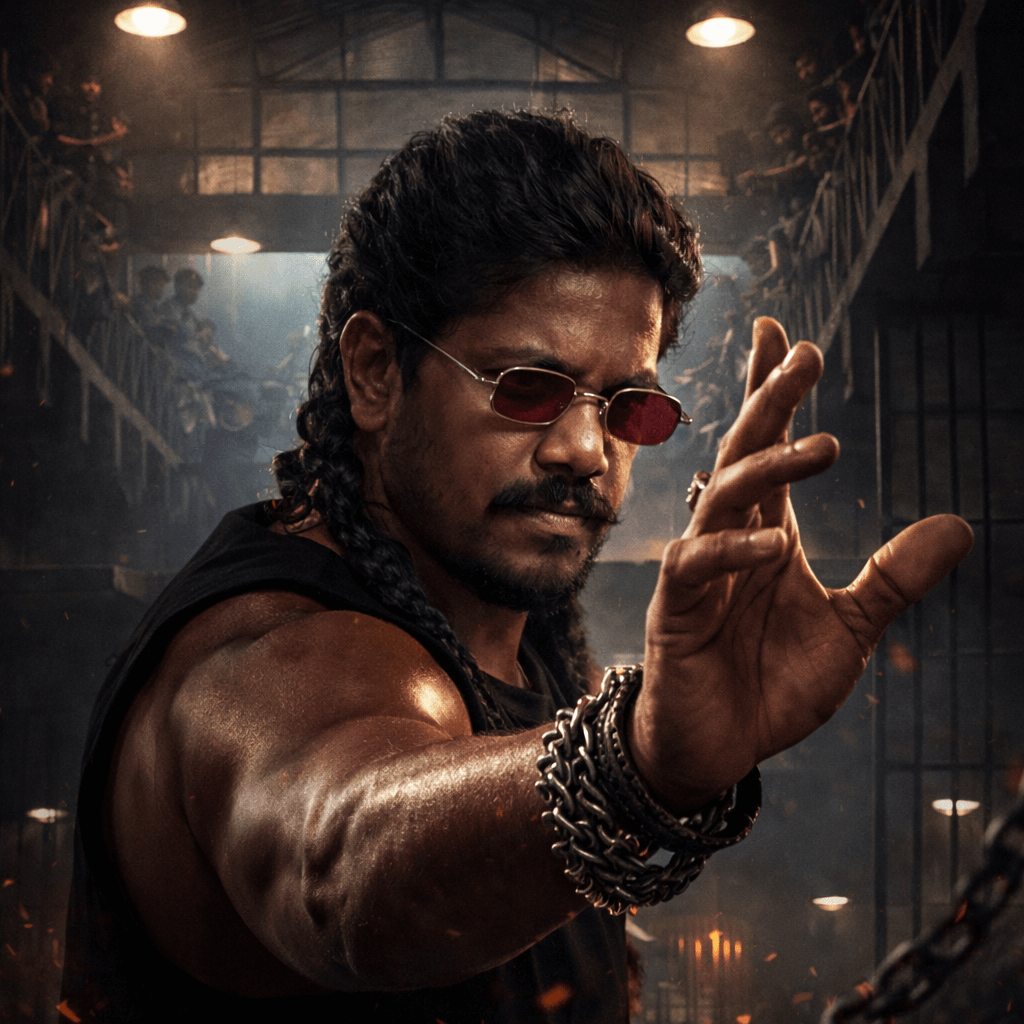
Ultra-realistic cinematic action movie poster. A powerful rugged Indian man with a thick beard and long wavy hair tied back, wearing small red-tinted round sunglasses, stands in an industrial prison-like interior.
He is positioned in the foreground performing an intense martial arts style hand gesture, one arm extended forward with fingers forming a powerful defensive pose. His muscular arm is highlighted with dramatic lighting, showing sweat and texture.
The environment is a large dimly lit prison block or warehouse hall, with metal railings, stairs, and multiple floors visible in the background. Several men stand on the upper balconies watching, creating a tense atmosphere.
Overhead industrial hanging lights cast strong cinematic beams, with dust particles and sparks floating in the air.
The character wears dark sleeveless clothing and heavy metal bracelets or chains on his wrist, emphasizing a tough rebellious personality.
Camera angle: low-angle cinematic shot, making the character appear dominant and powerful.
Color grading: warm tungsten lights mixed with cool shadows, dramatic contrast, gritty textures, smoky atmosphere.
Lighting: strong cinematic spotlight from above and behind, creating rim light around the character.
Text at the top in bold cinematic typography:
Style keywords:
ultra-realistic, cinematic lighting, action movie poster, gritty atmosphere, dramatic shadows, film grain, high detail, intense character portrait, blockbuster film poster, 8K.
Use the image for the face identity, and maintain the background features the same.
Match the face identity exactly (Strict 100% face identity from the reference image) including all the facial features including the shape, jawline, nose, eyes, eyebrows, cheecks, chin, forhead, ears, and lips.
How to Use These Prompts
1. Below each image, you will see a prompt box with two buttons: Copy and Share to AI.
2. You can tap Copy to copy the full prompt manually. Or simply tap Share to AI; this will automatically copy the prompt for you.
3. After tapping Share to AI, a list of popular AI tools like ChatGPT, Gemini, Copilot, and others will appear on your screen.
4. Click on any AI tool you prefer. It will directly open the selected AI platform.
5. Once the AI page opens, paste the prompt into the prompt box (it is already copied if you used Share to AI).
6. Upload your reference image if required.
7. Click generate, and your image will be created.
8. If needed, you can slightly adjust the prompt for lighting, angle, or mood and generate again.
9. Once you are satisfied with the result, download the image and save it for your use.
Customisation Tips
You can customise these prompts to create different variations while still maintaining the dark, intense cinematic style inspired by The Paradise. Try the following adjustments:
Change the lighting intensity
You can modify the lighting to create different moods. For example, increase the spotlight brightness, add subtle rim lighting, or introduce smoky backlight to enhance the dramatic atmosphere without changing the overall look.
Experiment with camera angles
While keeping the same cinematic feel, try slight angle variations such as a low-angle hero shot, a close-up portrait, or a medium cinematic frame. This helps create different poster compositions.
Adjust facial expressions
You can slightly change the expression while maintaining the intense character style. Try a stern look, a calm-confident stare, or a slightly aggressive expression for different poster moods.
Modify accessories and props
Small details like different chains, rings, sunglasses styles, or wrist accessories can add variation while keeping the rebellious character aesthetic.
Enhance environmental effects
Add subtle effects like drifting smoke, sparks, dust particles, or stronger shadows to increase the cinematic depth without changing the main theme.
Change the background intensity
You can slightly alter the background contrast or texture, such as darker shadows, more metallic reflections, or deeper colour tones, to enhance the dramatic look.
Experiment with colour grading
Adjust the colour tones while keeping the dark cinematic palette. Slight variations in red, gunmetal grey, teal shadows, or warm highlights can create different visual moods.